

Data for grant proposals that holds up to review
Social Explorer gives grant writers and program staff the data for grant proposals and needs assessments. Define your service area, pull small-area data on the topics funders ask about, and cite every number, so your application survives scrutiny.
How do you gather data for a grant proposal?
-
1
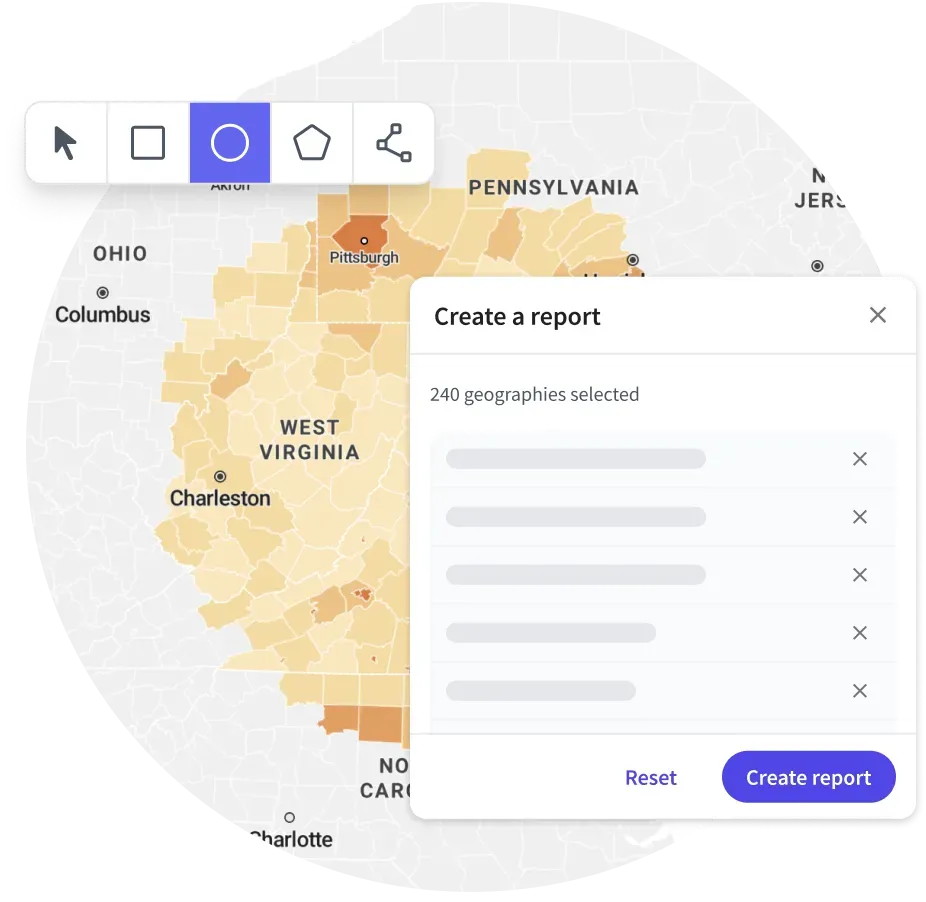
Selection toolbox
Define your service area: draw a polygon, select by circle with an exact distance, or load FIPS codes. Download the selection as a CSV to reuse in the next application.
-
2
Create a mask
Gray out everything outside your service area so the focus is clear.
-
3
Premade reports and report templates
Start from premade reports on topics funders ask about, such as age, education and employment, or save a template so every application uses the same tables.
-
4
Health and safety data
Add County Health Rankings indicators and FBI Uniform Crime Report data next to the demographics.
-
5
Citations
Every map and report generates a formatted citation in Chicago, MLA or APA with one click.
-
6
Stories
Publish your findings as an interactive story that reviewers can open without a Social Explorer account.
The data behind it
Part of a library of 610,000+ variables, each one with its source.
- American Community Survey, 5-year estimates Tract and block group data, the small areas a needs assessment depends on
- County Health Rankings Health outcomes and factors by county
- FBI Uniform Crime Report Reported crime
- CDC Social Vulnerability Index Premium collection
- Decennial Census Population counts and long-run context
Good to know
- Report links open for people with a Social Explorer subscription. For reviewers without one, publish a story or export the report as a PDF.
- Health indicators come from County Health Rankings. The CDC Social Vulnerability Index and the Air Quality Index are premium collections, and every plan includes them, Pro too.
Tools for this work

Questions about needs assessments and grant data
What is a community needs assessment?
A community needs assessment identifies the gaps between a community’s current conditions, in areas such as income, health, housing and access to services, and what its residents need, so a program can reach the right people and places. It usually pairs public data with local input; funders often ask for one, with cited data for the service area.
How do I conduct a needs assessment with Social Explorer?
In Social Explorer, define your service area by drawing it, selecting by distance or loading FIPS codes. Then start from premade reports on topics funders ask about, such as age, education and employment, add County Health Rankings and FBI crime data, and cite every table in Chicago, MLA or APA style.
What data do funders ask for in a grant proposal?
Most funders want the size and makeup of the population you serve, such as age, income, poverty, education, health and housing, for your exact service area. Social Explorer has these down to census tracts and block groups from the American Community Survey, with county health and crime data alongside and the CDC Social Vulnerability Index as a premium collection.
Can grant reviewers see my maps without an account?
Yes, if you publish a story: reviewers can open it and explore the maps without a Social Explorer account. Report links open only for people with a subscription, so for reviewers without one, export the report as a PDF and attach it. Every map and report also carries a formatted citation.
Other solutions
- Site selection Compare candidate areas on the demographics that drive your business.
- Market analysis Trade area analysis: size a market and track how it is changing.
- Data storytelling Turn a question into an interactive map or story.
- Equity analysis See which communities carry the heaviest burdens.
- Planning & policy Understand who lives where and how that is changing.
- Community change Show how a place has changed, with comparable data across decades.
- Census data Every census since 1790 and the latest American Community Survey, ready to map and analyze.
Try it on a place you know
In a live demo, we’ll show you how it fits your team or campus.